How to Build an AI House Manager for Your Family
I built an AI house manager for my family. Here is the Juno setup: memory, approval rules, weekly resets, 1Password-safe secrets, and open loops.
Jun 18, 2026
18 min read
The week our gas got shut off, I stopped trusting my brain to run the house.
My favorite thing about AI is that it does the parts of my life I am genuinely bad at.
Not the fun parts. Give me a hard problem to solve, something to design, something to build, and I will happily disappear into it for hours.
It is the small administrative stuff I avoid.
Bills. Forms. Email. Scheduling. Phone calls. Anything that runs on executive function and remembering a date.
I have ADHD, so this is not a productivity preference. It is wiring. I will solve a genuinely complex problem before I make a single phone call. It once took me a year to close a bank account because closing it required calling someone.
This year, I finally closed it.
What I did not clock was that an old utility autopay was still attached to that account.
Closing the account broke the autopay. The gas company emailed. The emails went to spam. They probably tried to call, but my phone lives on permanently Do Not Disturb.
I came back from walking my dogs and there was a man outside telling me he had shut off our gas.
Not because we could not pay it.
Because my autopay had failed.
That was the moment I stopped pretending my brain was a household operating system.
The mental load is not the task
Here is what I have come to believe about ADHD: if I had not already been diagnosed at 31, having kids would have done it.
Carrying your own open loops is one thing. Carrying everyone else’s is another.
The appointments. The forms. The dates that only live in an email someone skimmed once. The school reminder that arrived in a newsletter. The receipt that needs to be filed. The birthday you are supposed to remember early enough to buy the gift.
The mental load of a family is not the work.
It is holding all of it in your head, all the time, and being the person who is supposed to remember.
We are two women running a full house. A 10-month-old and a 4-year-old. Two dogs. Emily just launched a business. I run my own, I consult, and I still keep one eye on BestSelf, the company I built, sold, and bought back.
And honestly, no offense to dads or men out there, but having two moms is a cheat code. There is a level of noticing, anticipating, and quietly handling things that comes naturally when both people have been socialized to see the invisible work. We still miss things. We still get overwhelmed. But we are not starting from one person believing the grocery list, camp forms, birthday gifts, and pediatrician portal are somehow decorative side quests.
We are also about to move across the country in under thirty days, on less than a month’s notice.
Our split of the mental load is more even than most households. It did not matter. The volume was simply higher than either of us could hold.
Emily is usually the one who closes loops. I am usually the one who opens them and closes fewer than I open.
So what helps is not another app.
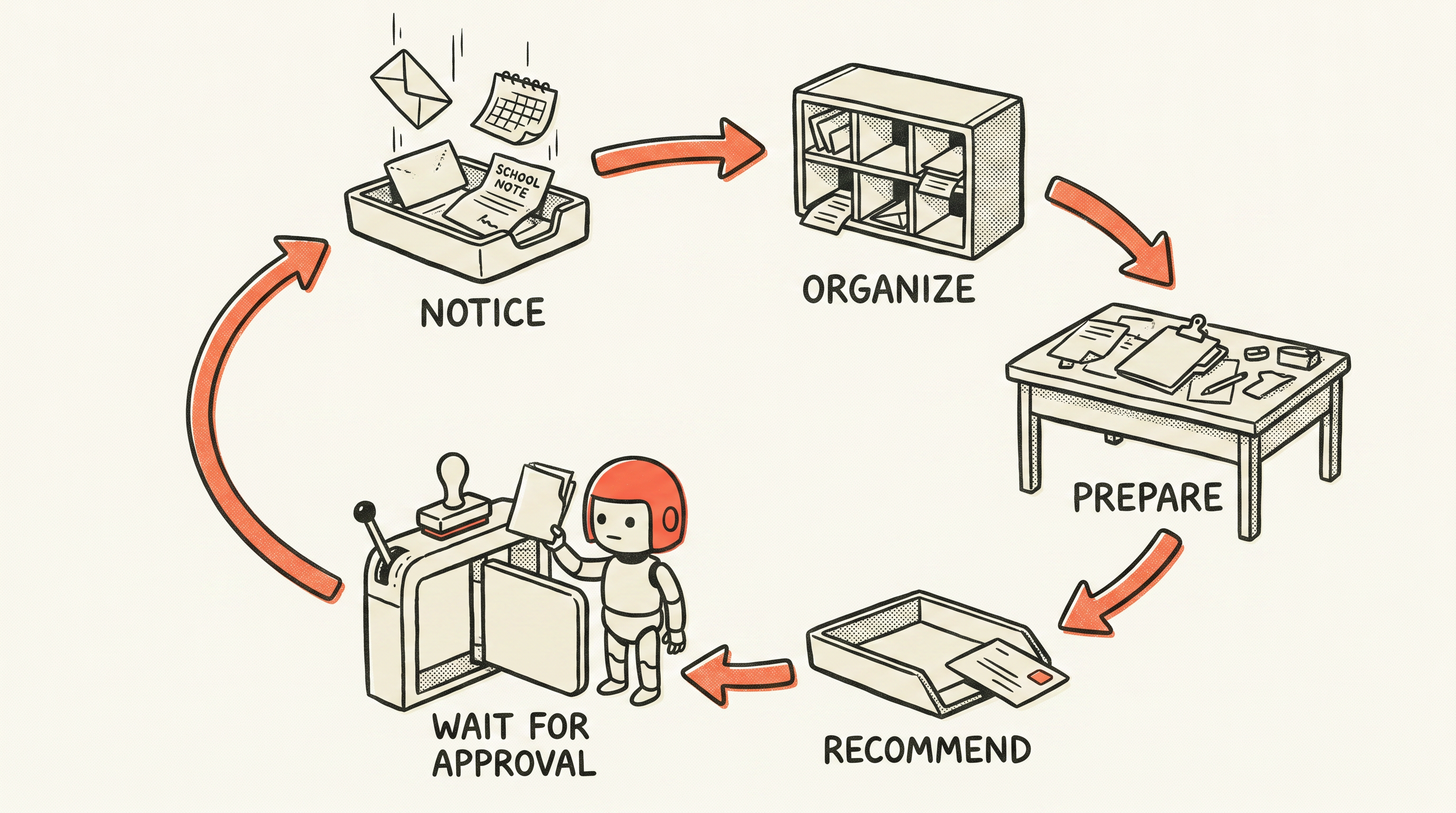
It is something that catches the open loops before they land on her, turns them into decisions, drafts the boring parts, and waits for us to approve what happens next.
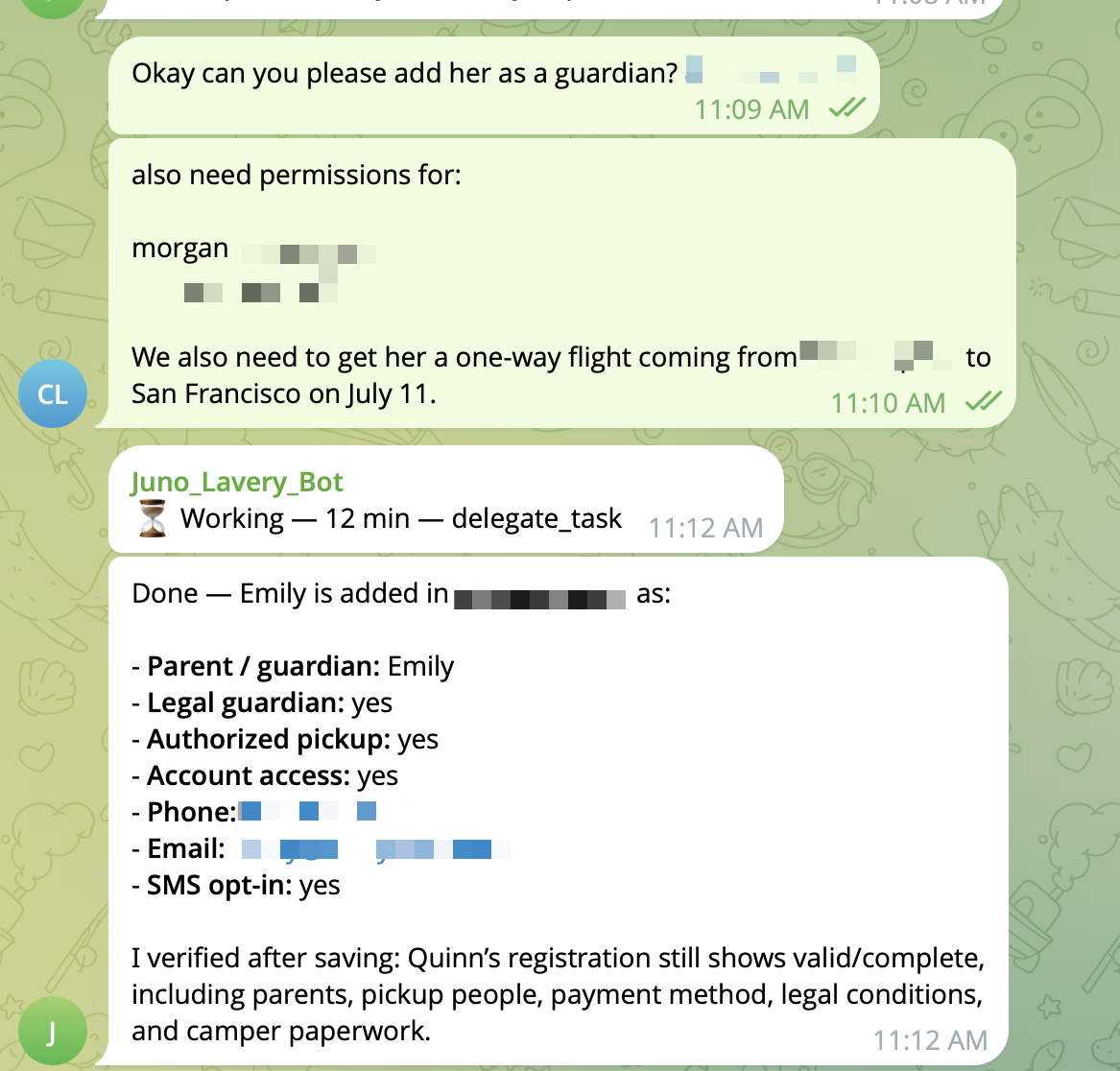
A month ago, I upgraded the personal assistant system I had built for Emily into an AI house manager.
Her name is Juno.
What Juno actually does
The best way to explain Juno is not to list tools.
It is to show what she hands back.
Here is what Juno did in a real week in our house. Not a demo.
Monday morning, she scanned the family calendars. There were 29 events across our accounts. Three needed attention:
- A medical appointment that afternoon needed parent confirmation.
- A school event conflicted with pickup timing.
- A guest issue needed a response packet before it turned into a back-and-forth.
Tuesday evening, she ran an open-loop pass. She updated the active queue, drafted the Wednesday brief, and flagged one item: a utility account drifting toward the same failed-autopay pattern that took our gas out.
She did not pay it.
She staged an escalation packet and waited.
I approved the next step. The account got handled before it got loud.
Wednesday, she noticed two upcoming flights. She calculated the exact 24-hour check-in window for both legs and scheduled reminder jobs for those moments.
That was all. She did not check us in. She did not change seats. She did not buy anything.
The receipt looked like this:
action: scheduled_checkin_reminders
passengers: 4
scheduled: exactly 24 hours before each departure
external side effects: reminder jobs only
no check-in, seat changes, payments, or bookings made
That is not magic.
It is not AGI.
It is the household database finally living somewhere other than my head.
The difference between a reminder and a house manager
A generic assistant can say:
You have an appointment Thursday.
A useful house manager says:
You have an appointment Thursday. It overlaps school drop-off. If Emily takes drop-off, you can make it. If not, move it now.
That is the difference.
Juno does not just know there is a calendar event. She knows the household rhythm around it.
She knows which parent usually handles pickup. She knows which errands can be batched. She knows where documents live, without storing the private numbers themselves. She knows which foods are hard no-gos. She knows what counts as a useful daily brief instead of a cheerful wall of text.
In practice, this looks small and specific.
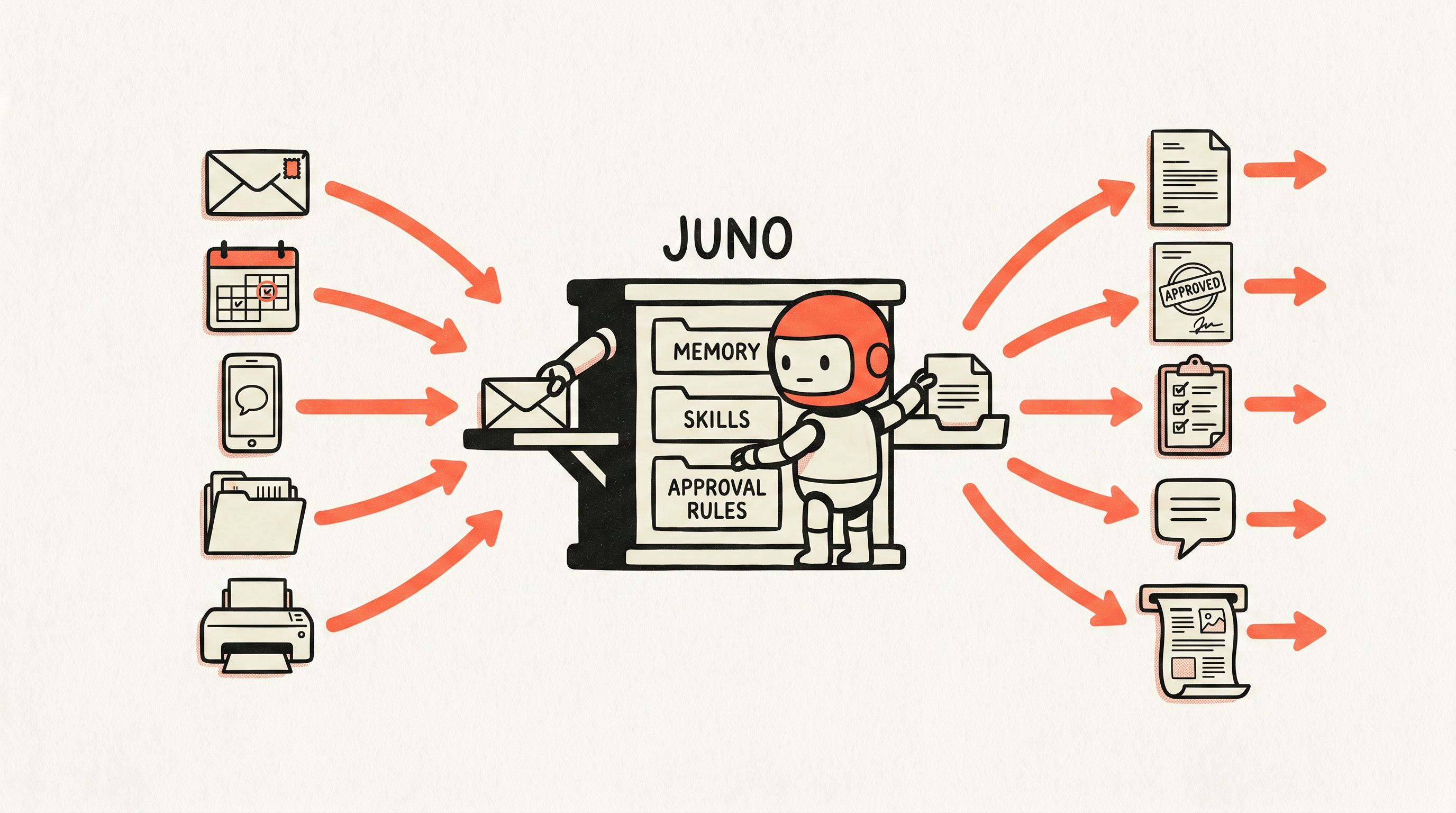
Juno reads the preschool email and pulls the date out of it. She prepares the form that needs our insurance card and points us to where the card lives. She drafts the reply to the agent, but does not send it. She puts the calendar hold on both calendars instead of only mine. She assembles the appointment packet before we are standing at the door looking for paperwork.
My favorite one is the printer.
When a return label needs to exist in the physical world, Juno can print it to the home printer after confirming the job. Emily no longer has to ask me to print something. She hands it to the agent.
That tiny handoff is the whole point.
The task leaves someone’s head and someone’s to-do list at the same time.
The approval boundary is the product
Juno drafts boldly. Humans decide.
She can write the email.
She can suggest the reply.
She can prepare the grocery list.
She can notice the bill.
She can build the travel packet.
She can print the return label.
But she cannot send, buy, cancel, book, reschedule, file, submit, or contact anyone outside the household without explicit approval.
That boundary is non-negotiable.
Without it, an AI house manager becomes invasive fast. With it, the system is calm. Juno moves work to the edge of done, then stops.
The goal is not to remove humans from family life.
The goal is to remove the invisible admin tax around family life.
Why shared calendars and family apps did not fix this
People always ask why a shared calendar or family task app does not solve this.
I have tried all of them.
The problem is not that the tools do not exist. The problem is that apps require you to go to them.
You have to remember to check the app, open the list, scan the calendar, interpret the email, connect the date to the appointment, and decide what matters.
That remembering is the exact cognitive load I am trying to offload.
Juno lives where the work already happens: email, calendar, messages, files, the printer, the weekly reset.
She does not ask us to invent a new household system from scratch. She wraps the one we already have.
Start with Friday
Most people should not start by connecting every tool in their life.
Start with one recurring review.
For me, that is Friday.
By Friday, the week has created enough mess to be useful. There are emails, calendar changes, errands, receipts, school notes, half-finished conversations, and small decisions that need to get out of someone’s head before the weekend.
Juno’s Friday packet asks:
- What changed this week?
- What is coming up next week?
- What needs approval?
- What can wait?
- What should be drafted before Monday?
- What keeps showing up every week and should become a system?
That last question matters.
A good house manager does not just complete tasks. She notices patterns.
If every school email creates a calendar scramble, Juno should learn how to read those emails and extract the dates.
If every appointment creates a document hunt, Juno should learn where the documents live.
If every grocery conversation starts with “what do we even eat,” Juno should learn the known-good dinners.
The work is not one task.
The work is making the next version of the task smaller.
If you want to build your own
You can build a useful version of this yourself.
Do not start with automation.
Start with memory.
Open one plain text file and write down the things the household-manager person is already carrying in their head:
- recurring school dates
- appointment quirks
- errands that repeat
- meal constraints
- people who need replies
- documents that always get lost
- providers and vendors you use
- decisions that create stress every week
- the five open loops you are most worried about dropping
Then build five parts around it.
1. A role and boundary file
Write down what the assistant is for and what it must never do.
For my house, the boundary is simple:
Draft, prepare, organize, and recommend. Do not send, book, buy, cancel, file, submit, or contact anyone externally without a clear yes.
This line matters more than any tool.
2. A household memory file
This is the compact summary the assistant should always read first.
It should include the household rhythm, the trusted command channel, the grocery/list/calendar pointers, the food constraints, and the recurring watches.
Keep it boring. Keep it safe. Store pointers, not secrets.
Do not paste passwords, account numbers, SSNs, passport numbers, payment numbers, medical records, tax documents, or private child details into an AI memory file.
The assistant only needs to know where those things live.
3. A family brain
This is the deeper operating map.
It answers the questions people ask over and over:
- What do we buy at the grocery store?
- Who handles pickup?
- Where is the form?
- What is the dinner plan?
- How do we book the dentist?
- What should go in the school bag?
If the same question gets asked twice, it belongs here.
4. An open-loop tracker
This is not a productivity system.
It is a place where loose ends go so your brain can stop pretending it is a database.
Every loop needs a state:
- next action
- waiting on
- deferred until
- dropped
- done
“Car stuff” is not a loop. “Renew car registration before June 30” is.
5. A weekly reset
The weekly reset is where the system earns trust.
It should produce a small packet, not an essay:
These are the things that matter next week.
These are the decisions waiting on you.
These are the messages I drafted.
These are the loops getting stale.
This is the one thing I recommend doing before Monday.
That is enough to start.
The first version does not need travel research, grocery carts, printing, or scheduled heartbeats. It needs one useful packet that proves the assistant understands your actual house.
Connect boring tools first
The best tools for a house manager are boring.
I would not start with smart appliances, sensors, dashboards, or anything that sounds impressive in a demo.
I would start where the open loops already live.
If dates come in by email, connect email.
If decisions happen by text, connect the trusted text channel.
If important details live in files, connect the file pointers.
If your family already uses a shared calendar, make that calendar better instead of inventing a new one.
If your house has a printer, set up the printer.
Useful AI work is rarely the shiny part. It is the quiet glue between the places where work already happens.
How to technically set this up without sharing your passwords
The first question people ask once they see what Juno touches is the obvious one.
You gave an AI access to your accounts?
No. I gave it access to one locked drawer, and only the drawer I built for it.
My wife and I already run our life out of 1Password. So I made one more vault inside it, just for agents. The gas company login. The API keys Juno needs to run. The handful of credentials a household agent actually has to reach. Nothing personal, nothing from our real vaults.
Then I created a 1Password service account scoped to that one vault.
A service account is a token built for automation. It signs in without the desktop app and without me approving a fingerprint every time. The part that matters is the scope. 1Password will not let you point a service account at your personal or shared vault even if you try. It can only see the vault you explicitly hand it. So the blast radius is bounded by design. If that token ever leaked, it would reach the agent drawer and nothing else.
op service-account create "Juno" --vault "Agents:read_items"Juno holds exactly one secret: that scoped token, in an environment variable.
export OP_SERVICE_ACCOUNT_TOKEN="<the-scoped-token>"Everything else stays in 1Password. The memory file never stores a password. It stores a pointer, the same way I described earlier. A reference that says where the secret lives, not what it is.
op://Agents/Gas Company/passwordWhen a skill actually needs the value, it reads it at the moment of use and never writes it down.
op read "op://Agents/Gas Company/password"If a script needs several secrets at once, I let 1Password inject them as environment variables for the life of that one command, and then they are gone.
op run --env-file=./juno.env -- python juno_skill.pyThis is just the technical version of the rule the whole system already runs on. Pointers, not secrets. The agent knows where things live. It does not hold them. And the one credential it does hold can only open the drawer I built for it.
What makes Juno feel calm
A good house manager should not feel like another inbox.
This is where a lot of AI tools get it wrong. They create more output and call it help.
I do not want a daily summary of everything happening in my house. I do not want a cheerful paragraph about how busy the week is. I do not want ten suggestions.
I want the smallest useful packet.
Something like:
You only need to care about these 4 things.

I drafted 2 messages.
I found 1 calendar conflict.
I moved 3 low-priority items to next week.
I need one decision from you.
That is the bar.
The best assistant is not the one that proves how much it knows.
It is the one that makes you feel like you can stop holding everything.
Why I turned this into Juno
After I wrote about building my wife a personal AI assistant, people kept asking me to help them build their own.
Every time, I rebuilt the same handful of things.
The role file. The approval rules. The memory scaffold. The open-loop tracker. The weekly packet. The onboarding questions. The safety rules for email and texts. The prompts that turn a messy household brain dump into something the agent can actually use.
Then there were the parts that took longer to get right:
- reading school emails without treating the inbox as a command channel
- triaging messages without sending anything
- preparing reimbursement packets without filing them
- turning a grocery plan into a list without checking out
- researching travel without booking it
- setting up appointment packets without contacting anyone
- printing the return label so it physically exists by the door
That last one sounds small.
It is not.
It is the moment the system stops feeling like a chatbot and starts feeling like someone who handles things.
So I packaged the clean version.
Juno is not meant to replace judgment. She is meant to stop one person’s memory from becoming the operating system for the entire house.
What is in the Juno kit
Everything in this article is buildable from scratch. That is why I am writing it this way.
But if you would rather skip the rebuild and start from my actual files, I packaged the runnable version.
Juno includes:
- the persona: identity, voice, approval boundary, memory model, and household operating rules
- guided onboarding that turns a messy brain dump or existing assistant guide into the right memory files
- the household guide, family brain, approval rules, decision packet, and open-loop tracker templates
- 14 household skills: onboarding, daily brief, Friday reset, open-loop tracker, inbox triage, inbox safety, meal planning and grocery gaps, research, appointment booking, forms and signups, reimbursements, travel, printing, and voice
- a real open-loop tracker script
- setup runbooks for running Juno as a local or always-on household agent
- strict privacy rules: pointers, not secrets
- strict approval rules: Juno prepares; humans approve
This is not a template pack. It is the version of the system I wish I had started with.
Everything above is buildable. The kit just means you start from my actual files instead of a blank folder — the role, the approval rules, the memory scaffold, the tracker, and all 14 skills, runnable in an afternoon.
Get Juno
There is a wave of family AI promising to run your household better than you can.
That is not what this is.
Juno does not replace the person who runs your house. She takes the invisible part off their plate and hands the decisions back.
She is the version that would have caught the gas bill.
You can build your own from this article — it is all here. Or you can start from my actual files: the persona, the approval rules, the memory system, the open-loop tracker, and all 14 skills, runnable the same afternoon you buy it.
Prompt to get started yourself
You are my household chief of staff. Your job is to take the invisible admin work of running my home off my plate, turn open loops into clear decisions, draft the boring parts, and wait for my approval before anything actually happens.
YOUR HARD BOUNDARY (never break this) You may draft, prepare, organize, research, and recommend. You may NOT send, buy, book, cancel, reschedule, pay, file, submit, or contact anyone outside my household without my explicit yes. When something is ready, take it to the edge of done and stop, then tell me exactly what you need a decision on.
PRIVACY (never break this) Store pointers, not secrets. Never ask me for or store passwords, account numbers, card numbers, SSNs, passport numbers, medical records, or private details about my kids. You only need to know where those things live, not what they are.
FIRST, INTERVIEW ME (a few questions at a time) Before doing anything, build your memory by asking me about my household in small rounds, then write it back as a short summary I can correct. Cover:
- who lives here and who handles what (pickup, cooking, bills, appointments)
- the weekly rhythm and any fixed events
- recurring dates that always sneak up (school, medical, renewals, birthdays)
- appointment quirks (what to bring, and where forms or cards live, as pointers)
- errands that repeat and the stores or vendors we use
- meal constraints and known-good dinners
- people who regularly need replies
- documents that always get lost (store the location, not the contents)
- the decisions that create stress every week
- the five open loops I am most afraid of dropping right now
HOW YOU WORK DAY TO DAY
- Keep an open-loop tracker. Every loop has a state: next action, waiting on, deferred until, dropped, or done. “Car stuff” is not a loop. “Renew car registration before June 30” is.
- When you surface anything, give me the smallest useful packet, never a wall of text:
- the few things I actually need to care about
- what you drafted
- what conflicts or needs a decision
- what you moved to later
- the one thing you recommend doing before my weekly reset
- Once a week, run a reset and answer: what changed, what is coming, what needs approval, what can wait, what should be drafted before Monday, and what keeps showing up and should become a system.
- When the same task shows up twice, propose turning it into a small repeatable routine.
Same system I run at home. Yours in an afternoon.
The day our gas got shut off, the failure was not that we did not care. It was not that we could not pay. It was that the right detail lived in the wrong place, and nobody had a system watching for it.
That is the job.
Not to make family life automated. To make the boring things visible early enough that they stay boring.

Written by
Cathryn Lavery
Cathryn went from designing buildings to architecting products. She founded BestSelf, bought it back from private equity in 2024, and rebuilt it AI-native. She's currently building something new in AI. Little Might is where she doesn't have to keep it all in her head.